
Triggered postcards · Bulk campaigns
Postcards that reach the doormat, not the spam folder.
A5 or A6 postcards, full-colour, double-sided, on 300gsm card. Trigger from your CRM, upload from the dashboard, or call the API. Same-day dispatch before 3pm. From 89p a postcard.
How it works
Design once. Send on every trigger.
Design and save
Build front and back with merge variables, then save it as a reusable template.
Connect your trigger
Your stack decides when to send — a Klaviyo flow, Shopify order, or your own backend.
Call the API
POST the template ID, recipient address, and variable values to /v1/prints.
We print and post
Same UK production path every time — full-colour, postage applied, same-day dispatch.
Two sizes
A5 or A6 — same quality, different impact.
A6 · 148 × 105 mm
Compact card, fits comfortably alongside other mail. Most cost-effective option for high-volume campaigns. From 89p per card.
A5 · 210 × 148 mm
Larger card for designs that need room to breathe. Stronger presence in a letterbox. From 91p per card.
When to send postcards
Use cases our customers run.
Where postcards earn their keep.
Email-unresponsive contacts
Email isn't reaching them. A postcard 30 days into silence can reactivate lapsed customers cheaper than paid social retargeting.
Cart recovery
Recover abandoned carts with a personal nudge on the doormat. Call the API from a Shopify Flow or your own backend when a cart ages past your threshold.
Post-purchase thank-yous
Thank customers for their first order or a milestone purchase. Handwritten-style cards convert into lifetime value better than email.
Local marketing
Local campaigns, event invites, grand opening announcements. Bring your own address list, or ask our team to source a local one for you.
Date-triggered mail
Birthday cards, renewal reminders, seasonal promotions — trigger the API from your CRM's date-based automation or a scheduled job.
Transactional
For buyers who check their post and not their inbox. Statement notices, appointment reminders, compliance prompts — all on a single card.
Design in the dashboard, or bring your own artwork
Intelliprint includes a built-in postcard designer. Build front and back on the canvas, save reusable templates, and send to a mailing list or trigger from your CRM — no PDF template download required.
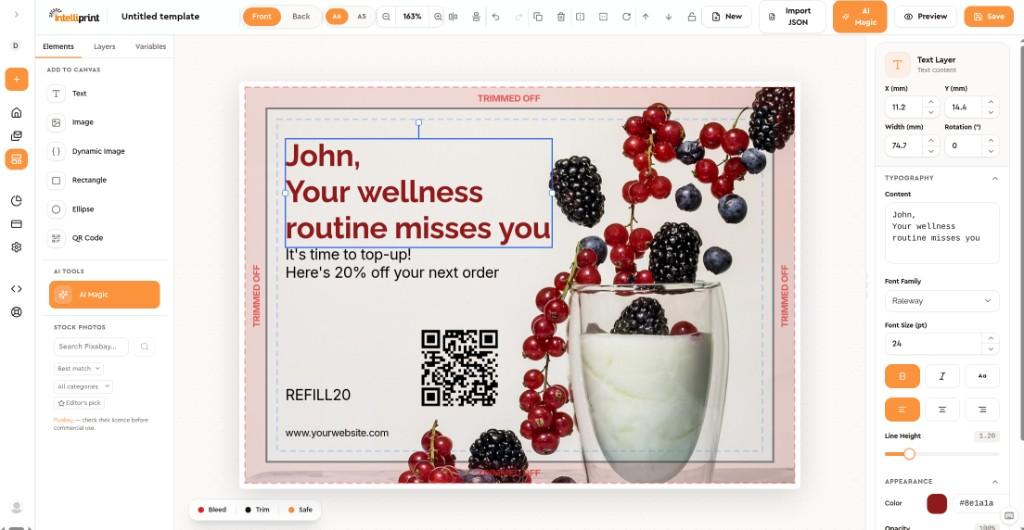
Three ways to create a postcard
Build from scratch — add text, images, QR codes, and merge variables on the canvas, with the address block positioned automatically on the back.
Import artwork — export front and back images from Canva, Photoshop, or similar and place them on the canvas, or upload finished designs when starting a print job.
Save and reuse — store designs as templates in your dashboard and send them manually, from mailing lists, or via API and automation.
For bleed, safe zones, and address-panel rules, see the design specifications.
Design once. Send every time a trigger fires.
You design and save the postcard template in Intelliprint. Deciding when it gets sent is entirely down to your own stack — a Klaviyo flow, a Shopify order event, a HubSpot workflow, or code you've written yourself. When that trigger fires, it calls the Intelliprint API with the template, the recipient's address, and any variable values for that send. We merge, print, and post the same day.
See the developer docs for full API reference and authentication details.
Ways to trigger a send
Wire a postcard send into any event you already track.
One API, called however fits your stack.
Klaviyo
Fire a webhook from a flow — abandoned cart, or a segment of contacts who haven't opened an email in 30 days.
Shopify
Call the API from a Shopify Flow HTTP request on an order, checkout, or customer event.
HubSpot
Trigger from a workflow on a lifecycle stage change or a high-intent form submission.
Mailchimp
Add a webhook step inside a re-engagement or win-back automation.
n8n
Use the official community node in a self-hosted or cloud n8n workflow.
Your own backend
No middleware needed — call the API directly on whatever event you define.
What the API call looks like
Every trigger above ends the same way: a POST to /v1/prints with the saved template id, the recipient's address, and a value for each {token} placeholder you added in the designer.
curl https://api.intelliprint.net/v1/prints -H "Authorization: Bearer $INTELLIPRINT_API_KEY" -H "Account: acct_..." -d template="tmpl_your_postcard" -d recipients[0][address][name]="Jane Smith" -d recipients[0][address][line]="123 High Street" -d recipients[0][address][postcode]="AB1 2CD" -d recipients[0][address][country]="GB" -d recipients[0][variables][first_name]="Jane" -d recipients[0][variables][discount_code]="SAVE20" -d confirmed="false"The same call your Klaviyo, Shopify, or HubSpot webhook would make — one address plus a value for each {token} in the design. Sending to a list instead? Pass mailing_list instead of recipients[].
Sending to many recipients at once instead of one at a time? See sending to a mailing list — pass a mailing_list instead of recipients[].
FAQ
Common postcard questions.
How much does each postcard cost?
A6 postcards start at 89p per card. A5 postcards start at 91p per card. Both include full-colour double-sided printing on 300gsm stock and 2nd Class postage. Upgrade to 1st Class, Signed, or Special Delivery at the postage rate. No setup fees, no minimum order.
When will my postcards arrive?
Uploads before 3pm are printed and dispatched the same day via Royal Mail. 1st Class typically delivers 1-2 working days, 2nd Class 2-3 working days.
How should I design my postcard?
Use the postcard designer in your Intelliprint dashboard to build front and back from scratch — add text, images, QR codes, and merge variables — or import finished artwork from tools like Canva and Photoshop as front and back images. You can also upload a PDF with front and back artwork when starting a print job. Save designs as templates and reuse them across campaigns or trigger them from the API.
Can I personalise each postcard?
Yes. Use merge variables in your design and pass recipient-specific data either in a CSV or via the API. Each card is printed with the individual recipient's information — no more expensive than a static campaign.
Can I trigger postcards from my CRM or workflow tool?
Yes. The Intelliprint API supports postcards with full product catalogue access, so any tool that can call a webhook or make an HTTP request can trigger a send — a Klaviyo flow, a Shopify Flow HTTP request action, a HubSpot workflow webhook, or your own backend on any event you define. Our n8n community node (n8n-nodes-intelliprint) also handles postcards natively. Our Zapier app currently handles letters only — if you're triggering postcards from a tool that talks to Zapier, route them through a webhook to our API instead.
What do I need to send with each API request?
A saved template id, the recipient's postal address, and a value for each {token} placeholder you added in the designer — the key must match the token name exactly, so {discount_code} in the design maps to variables[discount_code] in the request. Sending to many recipients at once instead of one? Pass a mailing_list instead, with a matching column for each variable.
Is my mailing list kept secure?
Documents are encrypted in transit, processed in our ISO 27001 certified facility (certification body 0120), and deleted after printing. GDPR compliant. Mailing lists are used only for the mailing you commissioned and not retained longer than necessary.
Ready when you are
Start sending postcards today.
No minimum order. Send one card or ten thousand. Pay per card, no contracts.